SSIS Dynamically Map Column Data Based on Column Pattern Profiling
Problem
The problem set here is what to do when faced with an input file that has columns with multiple types of content(Domains). For instance a single column may contain address, email, name or city state zip..
This example stems from a problem I faced recently with some banking data. We needed to load data into a Customer Dimension and MDM Tool and needed to get the data organized, in this case 8 input columns each with a different part of the address, name , company name or email. The goal was to send the data through an address correction tool as well, however simply concatenating all the columns was not an alternative.
Input File with multiple type of content in same column. The sample data was derived form the 2008 Adventure Works Sample. The TSQL for generating the sample is at the end of the article.

Approach
From a data profiling perspective the approach would be to identify if a column matches a particular pattern (address, email, city state zip, etc…) and then move the data into the appropriate labeled column

I have worked with Regular Expression in SSIS and decided to use them in a Script Component to acomplish the column pattern identification and then a Derived Column Transform to actually do the dynamic mapping.
Organized and properly mapped results.

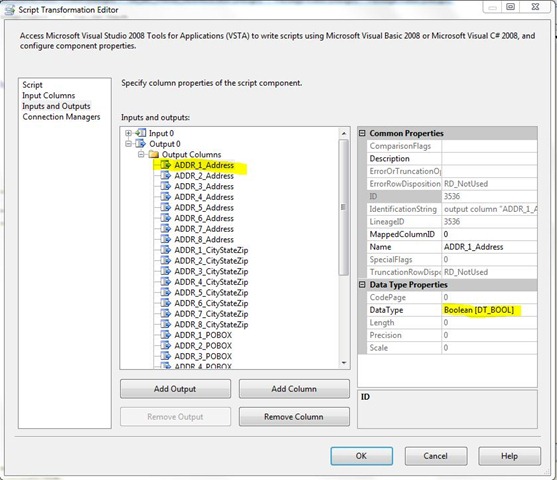
The major considerations are to add the necessary output columns as Booleans in the Script Component Editor. I have provided the input file and package.

Code
Here is the script. i did rely on Expresso to test the final Regular Expression.
‘ Microsoft SQL Server Integration Services Script Component
‘ Write scripts using Microsoft Visual Basic 2008.
‘ ScriptMain is the entry point class of the script.
Imports System
Imports System.Data
Imports System.Math
Imports Microsoft.SqlServer.Dts.Pipeline.Wrapper
Imports Microsoft.SqlServer.Dts.Runtime.Wrapper
<Microsoft.SqlServer.Dts.Pipeline.SSISScriptComponentEntryPointAttribute> _
<CLSCompliant(False)> _
Public Class ScriptMain
Inherits UserComponent
Dim patAlphaUpper As String = "[^a-z0-9 ,@%&/#’.-]"
Dim patAlphaLower As String = "[^A-Z0-9 ,@%&/#’.-]"
Dim patNum As String = "[^A-Za-z ,@%&/#’.-]"
Dim patSpecial As String = "[^A-Za-z0-9@&#]"
‘Dim patEmail As String = "b[A-Za-z0-9._%-]+@[A-Za-z0-9.-]+.[A-Za-z]{2,4}b"
Dim patEmail As String = "([a-zA-Z0-9_-.]+)@(([[0-9]{1,3}.[0-9]{1,3}.[0-9]{1,3}.)|(([a-zA-Z0-9-]+.)+))([a-zA-Z]{2,4}|[0-9]{1,3})"
Dim patUSPhone As String = "^(?:(?<1>[(])?(?<AreaCode>[1-9]d{2})(?(1)[)])(?(1)(?<2>[ ])|(?:(?<3>[-])|(?<4>[ ])))?)?(?<Prefix>[1-9]d{2})(?(AreaCode)(?:(?(1)(?(2)[- ]|[-]?))|(?(3)[-])|(?(4)[- ]))|[- ]?)(?<Suffix>d{4})$"
Dim patAddress As String = "w*s*d+s+w+s*w*"
Dim patCityStateZip As String = "w+s+w+s+d{5}"
‘Dim patPOBOX As String = "[poPO]+[BbOoXx]+s*d+"
Dim patPOBOX As String = "^b[P|p]*(OST|ost)*.*s*[O|o|0]*(ffice|FFICE)*.*s*[B|b][O|o|0][X|x]bs+d+s*$"
Dim rgxAlphaUpper As New Text.RegularExpressions.Regex(patAlphaUpper)
Dim rgxAlphalower As New Text.RegularExpressions.Regex(patAlphaLower)
Dim rgxSpecial As New Text.RegularExpressions.Regex(patSpecial)
Dim rgxNum As New Text.RegularExpressions.Regex(patNum)
Dim rgxEmail As New Text.RegularExpressions.Regex(patEmail)
Dim rgxPhone As New Text.RegularExpressions.Regex(patUSPhone)
Dim rgxAddress As New Text.RegularExpressions.Regex(patAddress)
Dim rgxCityStateZip As New Text.RegularExpressions.Regex(patCityStateZip)
Dim rgxPOBOX As New Text.RegularExpressions.Regex(patPOBOX)
Dim tagAlphaUpper As String
Dim tagAlphaLower As String
Dim tagNumber As String
Dim ADDR1Work As String
Dim ADDR2Work As String
Dim ADDR3Work As String
Dim ADDR4Work As String
Dim ADDR5Work As String
Dim ADDR6Work As String
Dim ADDR7Work As String
Dim ADDR8Work As String
Public Overrides Sub PreExecute()
MyBase.PreExecute()
‘
‘ Add your code here for preprocessing or remove if not needed
‘
End Sub
Public Overrides Sub PostExecute()
MyBase.PostExecute()
‘
‘ Add your code here for postprocessing or remove if not needed
‘ You can set read/write variables here, for example:
‘ Me.Variables.MyIntVar = 100
‘
End Sub
Public Overrides Sub Input0_ProcessInputRow(ByVal Row As Input0Buffer)
ADDR1Work = rgxSpecial.Replace(Row.ADDRLNE1TXT, " ")
ADDR2Work = rgxSpecial.Replace(Row.ADDRLNE2TXT, " ")
ADDR3Work = rgxSpecial.Replace(Row.ADDRLNE3TXT, " ")
ADDR4Work = rgxSpecial.Replace(Row.ADDRLNE4TXT, " ")
ADDR5Work = rgxSpecial.Replace(Row.ADDRLNE5TXT, " ")
ADDR6Work = rgxSpecial.Replace(Row.ADDRLNE6TXT, " ")
ADDR7Work = rgxSpecial.Replace(Row.ADDRLNE7TXT, " ")
ADDR8Work = rgxSpecial.Replace(Row.ADDRLNE8TXT, " ")
Row.ADDR1Address = rgxAddress.IsMatch(ADDR1Work)
Row.ADDR2Address = rgxAddress.IsMatch(ADDR2Work)
Row.ADDR3Address = rgxAddress.IsMatch(ADDR3Work)
Row.ADDR4Address = rgxAddress.IsMatch(ADDR4Work)
Row.ADDR5Address = rgxAddress.IsMatch(ADDR5Work)
Row.ADDR6Address = rgxAddress.IsMatch(ADDR6Work)
Row.ADDR7Address = rgxAddress.IsMatch(ADDR7Work)
Row.ADDR8Address = rgxAddress.IsMatch(ADDR8Work)
Row.ADDR1CityStateZip = rgxCityStateZip.IsMatch(ADDR1Work)
Row.ADDR2CityStateZip = rgxCityStateZip.IsMatch(ADDR2Work)
Row.ADDR3CityStateZip = rgxCityStateZip.IsMatch(ADDR3Work)
Row.ADDR4CityStateZip = rgxCityStateZip.IsMatch(ADDR4Work)
Row.ADDR5CityStateZip = rgxCityStateZip.IsMatch(ADDR5Work)
Row.ADDR6CityStateZip = rgxCityStateZip.IsMatch(ADDR6Work)
Row.ADDR7CityStateZip = rgxCityStateZip.IsMatch(ADDR7Work)
Row.ADDR8CityStateZip = rgxCityStateZip.IsMatch(ADDR8Work)
Row.ADDR1POBOX = rgxPOBOX.IsMatch(ADDR1Work)
Row.ADDR2POBOX = rgxPOBOX.IsMatch(ADDR2Work)
Row.ADDR3POBOX = rgxPOBOX.IsMatch(ADDR3Work)
Row.ADDR4POBOX = rgxPOBOX.IsMatch(ADDR4Work)
Row.ADDR5POBOX = rgxPOBOX.IsMatch(ADDR5Work)
Row.ADDR6POBOX = rgxPOBOX.IsMatch(ADDR6Work)
Row.ADDR7POBOX = rgxPOBOX.IsMatch(ADDR7Work)
Row.ADDR8POBOX = rgxPOBOX.IsMatch(ADDR8Work)
Row.ADDR1Email = rgxEmail.IsMatch(Row.ADDRLNE1TXT)
Row.ADDR2Email = rgxEmail.IsMatch(Row.ADDRLNE2TXT)
Row.ADDR3Email = rgxEmail.IsMatch(Row.ADDRLNE3TXT)
Row.ADDR4Email = rgxEmail.IsMatch(Row.ADDRLNE4TXT)
Row.ADDR5Email = rgxEmail.IsMatch(Row.ADDRLNE5TXT)
Row.ADDR5Email = rgxEmail.IsMatch(Row.ADDRLNE6TXT)
Row.ADDR7Email = rgxEmail.IsMatch(Row.ADDRLNE7TXT)
Row.ADDR8Email = rgxEmail.IsMatch(Row.ADDRLNE8TXT)
End Sub
End Class
After the script component applys the pattern matching(Regular Expression) we use the Derived Column with a series of Condition Expression to populat each column. Here is a sample for mapping the address column Address , the rest are included in the attached package.
Derived Column code:
ADDR_1_Address == TRUE && ADDR_1_CityStateZip == FALSE ? ADDR_LNE_1_TXT : ADDR_2_Address == TRUE && ADDR_2_CityStateZip == FALSE ? ADDR_LNE_2_TXT : ADDR_3_Address == TRUE && ADDR_3_CityStateZip == FALSE ? ADDR_LNE_3_TXT : ADDR_4_Address == TRUE && ADDR_4_CityStateZip == FALSE ? ADDR_LNE_4_TXT : ADDR_5_Address == TRUE && ADDR_5_CityStateZip == FALSE ? ADDR_LNE_5_TXT : ADDR_6_Address == TRUE && ADDR_6_CityStateZip == FALSE ? ADDR_LNE_6_TXT : ADDR_7_Address == TRUE && ADDR_7_CityStateZip == FALSE ? ADDR_LNE_7_TXT : ADDR_8_Address == TRUE && ADDR_8_CityStateZip == FALSE ? ADDR_LNE_8_TXT :
"No Address"
TSQL for generating sample input:
SELECT TOP (15)
CAST(CustomerKey as Varchar(50)) as ADDR_LNE_1_TXT
, ISNULL(DimCustomer.FirstName,’ ‘ ) + ‘ ‘ + ISNULL(DimCustomer.MiddleName,” ) + ‘ ‘ + ISNULL(DimCustomer.LastName,’ ‘ ) as ADDR_LNE_2_TXT
, ISNULL(DimCustomer.AddressLine1,’ ‘ ) + ‘ ‘ + ISNULL(DimCustomer.AddressLine2,” )as ADDR_LNE_3_TXT
,DimCustomer.EmailAddress as ADDR_LNE_4_TXT
, ISNULL(DimGeography.City,’ ‘ ) + ‘ ‘ + ISNULL(DimGeography.StateProvinceCode,” ) + ‘ ‘ + ISNULL(DimGeography.PostalCode,” )as ADDR_LNE_5_TXT
, StateProvinceName as ADDR_LNE_6_TXT
, DimGeography.CountryRegionCode as ADDR_LNE_7_TXT
, EnglishEducation as ADDR_LNE_8_TXT
INTO ADDRESS_PARSE_DEMO
FROM DimCustomer INNER JOIN
DimGeography ON DimCustomer.GeographyKey = DimGeography.GeographyKey
Where CustomerKey in ( 11021 , 11022 ,11023 ,11024 ,11036)
Union All
SELECT TOP (15)
EnglishEducation as ADDR_LNE_1_TXT
, ISNULL(DimCustomer.FirstName,’ ‘ ) + ‘ ‘ + ISNULL(DimCustomer.MiddleName,” ) + ‘ ‘ + ISNULL(DimCustomer.LastName,’ ‘ ) as ADDR_LNE_2_TXT
, ISNULL(DimCustomer.AddressLine1,’ ‘ ) + ‘ ‘ + ISNULL(DimCustomer.AddressLine2,” )as ADDR_LNE_3_TXT
,DimCustomer.EmailAddress as ADDR_LNE_4_TXT
, ISNULL(DimGeography.City,’ ‘ ) + ‘ ‘ + ISNULL(DimGeography.StateProvinceCode,” ) + ‘ ‘ + ISNULL(DimGeography.PostalCode,” )as ADDR_LNE_5_TXT
, StateProvinceName as ADDR_LNE_6_TXT
, DimGeography.CountryRegionCode as ADDR_LNE_7_TXT
, CAST(CustomerKey as Varchar(50)) as ADDR_LNE_8_TXT
—INTO ADDRESS_PARSE_DEMO
FROM DimCustomer INNER JOIN
DimGeography ON DimCustomer.GeographyKey = DimGeography.GeographyKey
Where CustomerKey in (11021 , 11022 ,11023 ,11024 ,11036)
Union All
SELECT TOP (15)
ISNULL(DimGeography.City,’ ‘ ) + ‘ ‘ + ISNULL(DimGeography.StateProvinceCode,” ) + ‘ ‘ + ISNULL(DimGeography.PostalCode,” )as ADDR_LNE_1_TXT
, StateProvinceName as ADDR_LNE_2_TXT
, DimGeography.CountryRegionCode as ADDR_LNE_3_TXT
, CAST(CustomerKey as Varchar(50)) as ADDR_LNE_4_TXT
, EnglishEducation as ADDR_LNE_5_TXT
, ISNULL(DimCustomer.FirstName,’ ‘ ) + ‘ ‘ + ISNULL(DimCustomer.MiddleName,” ) + ‘ ‘ + ISNULL(DimCustomer.LastName,’ ‘ ) as ADDR_LNE_6_TXT
, ISNULL(DimCustomer.AddressLine1,’ ‘ ) + ‘ ‘ + ISNULL(DimCustomer.AddressLine2,” )as ADDR_LNE_7_TXT
,DimCustomer.EmailAddress as ADDR_LNE_8_TXT
FROM DimCustomer INNER JOIN
DimGeography ON DimCustomer.GeographyKey = DimGeography.GeographyKey
Where CustomerKey in ( 11040 ,11041 ,11042 ,11043, 11049)
Ira Warren Whiteside
Actuality Business Intelligence
"karo yaa na karo, koshish jaisa kuch nahi hai"
"Do, or do not. There is no try."


 Ira Warren Whiteside's Blog - Information Sherpa